











Introduction to BetKing Mobile
Most betting in Nigeria happens on a phone rather than a laptop. Data is bought in bundles, network quality can shift between 4G and a weak 3G signal, and the handset may be several years old. BetKing Mobile is built around that reality: it is a browser-based sportsbook that loads in Chrome, Opera or Safari without requiring an installation.

This guide covers the responsive layout, the Lite interface, the older mobile experience and the desktop view available through a phone browser. It also explains device compatibility and practical ways to reduce loading problems on Nigerian networks. Betting is for adults only, 18+.
Features of BetKing Mobile
The mobile site reflows into a single column, with menus and event cards sized for touch. The bet slip is normally opened from a counter at the top or bottom of the screen, so you can review selections and stake without leaving the market. Odds can update in place, which is useful but means you should check the final figures before confirming.

Deposits, withdrawal requests, bet history and open bets are available from the account menu during the same session. Live markets are grouped by event and may show a running score, but a stable connection is especially important when odds are changing. If you have not opened an account, the registration form is designed for use on a phone keyboard.
- Sportsbook: football, basketball, tennis and other markets in collapsible menus.
- Live section: in-play events with current scores and changing odds.
- Bet slip: single, multiple and system bets with a potential return.
- Account tools: balance, transactions, settled bets and pending bets.
BetKing Lite Explained
BetKing Lite is a simplified interface for low-end handsets and slower connections. It removes much of the heavy visual layer, including large banners, animation and decorative images, while keeping text, odds and controls.
The lighter page generally transfers less data and puts less pressure on limited phone memory. You can still select markets, build a slip and place a bet, although the standard layout may be more convenient for richer information. If the phone becomes slow during a busy evening fixture, Lite is a sensible option to try first.
BetKing Old Mobile Version
The older mobile interface is remembered for its plain pages, quick loading and familiar menu structure. Regular users often preferred it because it worked comfortably on basic phones and weak connections.
Older mobile addresses now lead to the current responsive pages. The modern interface covers the same core markets, while Lite provides a similar speed advantage for users who need fewer visual elements. There is no need to rely on an unofficial copy of an old page.
Mobile vs Desktop Version
Both views use the same account and balance, but they present information differently. Desktop is useful when comparing many markets or building a longer accumulator, while mobile keeps the main controls within easy reach.
The practical differences are shown below.
| Feature | Mobile | Desktop |
|---|---|---|
| Layout | Single column and stacked blocks | Multi-column with side menus |
| Navigation | Tap menus and collapsible lists | Persistent sidebar and top bar |
| Screen optimization | Designed for small displays | Designed for wide monitors |
| Speed | Usually uses less data | Depends more on the connection |
| Convenience | Quick access on the move | More room for detailed slips |
Accessing Desktop Mode from a Smartphone
Modern mobile browsers can request the full desktop layout. In Chrome for Android, open the three-dot menu and select Desktop site. In Safari on iPhone, open the page settings beside the address bar and choose Request Desktop Website. Opera and Firefox offer a similar setting in their main menus.
Desktop mode can help when a wider coupon or a control is easier to see on a large layout. The trade-off is smaller text, more zooming and higher data use. For everyday use, the standard sports betting section is usually easier to handle on a phone. Turn desktop mode off from the same browser menu.
Device Support and Performance Tips
Android phones, iPhones and tablets can use the mobile site through a current browser. Tablets may show a layout closer to desktop because of their extra width. Older phones can still work, but outdated browsers may display menus incorrectly, making the lighter interface a useful alternative.
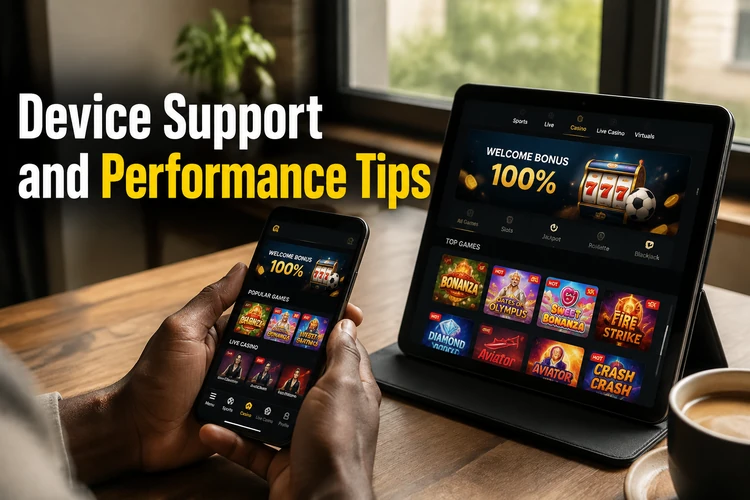
If pages feel sluggish, update the browser before changing anything else. Clear its cache, close unused tabs and move to a place with a steadier signal before placing a live bet. The mobile app information may also be useful if you prefer an installed experience.
- Step 1: Update the browser through the Play Store or App Store.
- Step 2: Clear cached files and old cookies, then reload the page.
- Step 3: Close background apps that use memory or data.
- Step 4: Use stable Wi-Fi or mobile coverage for live betting.
- Step 5: Keep portrait mode for menus and use landscape for wide tables.
FAQ
It is the browser version of the sportsbook adapted for phone screens. Open it in a current mobile browser, sign in with your usual details and use the available markets, bet slip and account tools in a compact layout.
Lite is a simplified interface with fewer banners, images and animations. It is intended to reduce page weight and can be more comfortable on an entry-level phone or a weaker connection. You can still choose markets, build a slip and confirm a stake.
Often, yes, if the phone has a reasonably current browser. Very old browsers may display menus poorly, so update the browser first and try the lighter interface if the standard page remains slow.
Yes. Use the desktop-site option in the browser menu to request the wider layout. Text and controls may become smaller, and the page can use more data, so the standard mobile view is usually more practical for regular use.
Older mobile addresses now lead to the current responsive pages. The current site retains the main markets and account functions, while Lite offers a less visual experience for devices that need faster loading.
It is designed for use on common mobile connections, including 3G and 4G. A stable signal still matters for live betting because odds can change while a selection is being made, and Lite may help reduce data and loading time.